Best IDM Alternative: Top Internet Download Managers
Tired of dealing with slow download speeds and incomplete files? IDM, or Internet Download Manager, has long been a popular choice for many users due to its efficiency and robust features. However, you might be looking for alternatives due to cost, compatibility issues, or simply wanting to explore other options. We've compiled a list of the best IDM alternatives that you might find useful.
Before we dive into the details, remember that while these alternatives share many similar features with IDM, each has its unique strengths. It's essential to choose one that aligns best with your specific needs and preferences.
Download Accelerator Plus
Download Accelerator Plus, often abbreviated as DAP, is one of the most feature-rich IDM alternatives available. It's not free, but it offers a free trial that should give you enough time to decide if it's worth upgrading.


DAP supports resume functionality, which means you can pause and resume downloads at any time. It also offers fantastic integration with your browser, allowing you to download files with just a single click. Additionally, this tool supportsvideo and audio streaming, ensuring you always get smooth playback.
Supported Operating Systems
DAP is compatible with Windows, Mac, and Linux, making it an ideal choice if you use multiple operating systems. However, keep in mind that while it works well with all these platforms, some features might not be available on every OS.


Another thing to consider with DAP is its interface. Some users might find it a bit overwhelming due to the sheer number of features available. However, once you spend some time learning and configuring it according to your needs, DAP can be an incredibly powerful tool.
Customizable Download Queues
One of DAP's most standout features is its customizable download queues. You can prioritize downloads based on size, type, or even the network conditions. This feature ensures that you always have maximum control over your downloads and can manage them more effectively.
Furthermore, DAP's scheduling features allow you to set specific times for downloads to take place. This means you can set large files to download overnight when network traffic is less, thus ensuring faster download speeds.


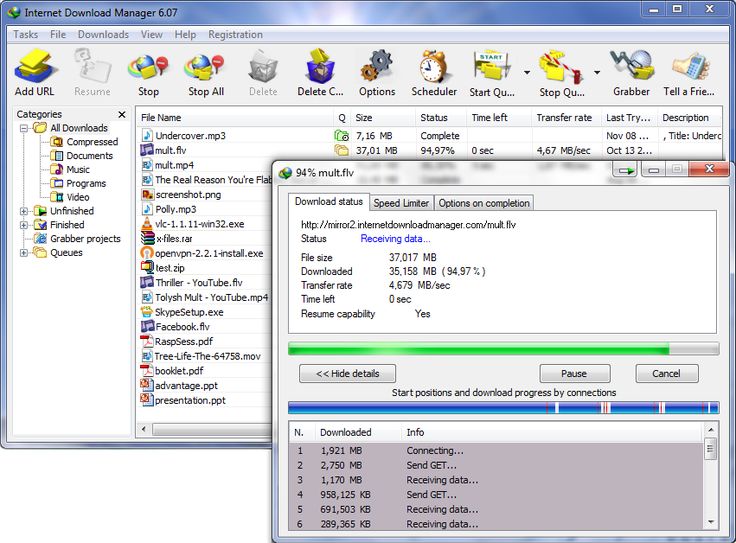


Free Download Manager
Free Download Manager, or FDM, is another excellent IDM alternative that's known for its speed and efficiency. One of the standout features of this tool is its powerful accelerator, which ensures that your downloads are always as fast as they can be.
FDM also supports resumed downloads and offers a user-friendly interface that's easy to navigate. It supports a wide range of protocols, including HTTP, HTTPS, FTP, and BitTorrent. This makes it an incredibly versatile tool that can handle a wide variety of download tasks.
Built-in Video Grabber
One of the unique features of FDM is its built-in video grabber. This allows you to capture online videos directly from streaming websites and save them to your device. This feature is particularly useful if you spend a lot of time watching videos online and want to save them for offline viewing.


However, it's essential to note that saving copyrighted material without permission is illegal, so always ensure you have the necessary rights before downloading any content.
Versatile File Management
FDM also offers excellent file management features. It allows you to arrange your downloads into categories based on their type, size, or even the website they were downloaded from. This ensures that your download folders are always well-organized and easy to navigate.
Moreover, FDM supports folder tags, which can make it even easier to find specific downloads in the future. This feature can be incredibly helpful if you download a lot of files and want to keep them organized.
Internet Download Manager Lite
If you're looking for a free, lightweight alternative to IDM, Internet Download Manager Lite might be just what you need. As the name suggests, it's a lighter version of the classic IDM, with a stripped-down feature set designed for users who don't need all the advanced features of the full version.
Despite its reduced feature set, IDM Lite still offers many of the key features you'd expect from a download manager. It supports resumed downloads, offers fast download speeds, and even includes a basic scheduler function.
Integrated Downloader and Browser
One of the most unique features of IDM Lite is the integrated downloader and browser. This means you can browse the web and download files directly from the app without having to open a separate browser window.
The integrated browser offers full support for modern web technologies, including HTML5 and JavaScript. It even includes a built-in ad blocker to prevent annoying ads from slowing down your downloads.
Simple and User-Friendly Interface
Another standout feature of IDM Lite is its simple, user-friendly interface. While it might not be as flashy as some of the other tools on this list, it's incredibly easy to use and perfect for download beginners.
The interface is clean and modern, with a focus on simplicity and ease of use. It also includes a context menu that allows you to pause, resume, or download files directly from your desktop or taskbar.
Remember, the choice of download manager depends on your specific needs. Whether you're looking for a feature-rich tool like Download Accelerator Plus or a simpler, more lightweight alternative like Internet Download Manager Lite, there's a tool out there that's perfect for you. So, experiment with a few different options and see which one works best for you.
Related Articles

Mastering ServSafe 2025: Ultimate Practice Test for Managers
In the dynamic world of food safety, staying current with best practices is not just a recommendation, but a necessity. As we stride towards 2025, the ServSafe...

Best BBB Logo Images for Download in 2022
The ubiquitous.black and white Lakers logo, with its distinctive design and eye-catching colors, has become synonymous with basketball worldwide. As a crucial...

Smart PSS Alternatives: Best Software for Enhanced Productivity
In the ever-evolving landscape of smart παρουσ, managing and optimizing photos has become an intricate task, pushing the need for advanced, user-friendly...
Smart Install Manager Download
The INTERNET OF THINGS (IoT) has revolutionized the tech landscape, enabling seamless connectivity and interoperability among devices. However, management of...

Best Internet Providers in Peru: 2023's Top Picks
Over recent years, Peru has witnessed a significant digital boom, with internet penetration rates rising steadily. As a result, the demand for high-speed...

Best Peru Internet Providers: Compare & Choose Now
Ideal for keeping up with friends, family, or work, Peru's internet providers offer a range of services to suit different needs. From high-speed fiber optic...