Preventive Maintenance Examples: Keeping Your Computers Running Smooth
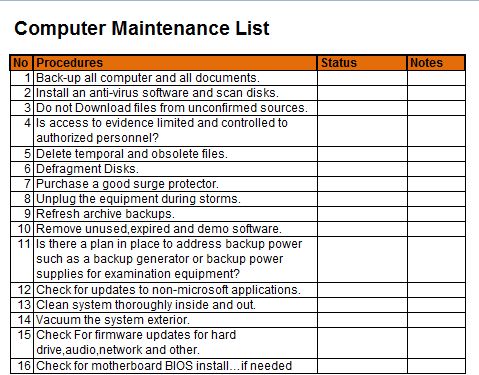
Regular maintenance is vital for ensuring the longevity and optimal performance of computer systems. This is where preventive maintenance comes in, encompassing a range of strategies aimed at minimizing breakdowns, maximizing lifespan, and improving overall productivity. Let's delve into some practical examples of preventive maintenance in computers.
First, it's crucial to understand that preventive maintenance isn't just about solving problems before they occur but also about maintaining existing systems' condition to keep them running efficiently.
Physical Cleanliness and Dust Management
One of the most basic yet critical aspects of computer preventive maintenance is keeping your computer clean and free from dust. Dust and dirt can accumulate in fans, heat sinks, and other critical components, causing overheating and potential failure.


jährlich to use compressed air or a soft brush to remove dust from fans, vents, and other external surfaces. For internal components, only use non-static brushes and leave the task to professionals to avoid voltage shocks or damage from electrostatic discharge (ESD).
Desk Organization
Keeping your workspace tidy can significantly impact your computer's lifespan. A cluttered desk can lead to accidental damage caused by tea spills, heavy objects falling, or even tripping hazards that might pull out cables or topple the entire system.


To prevent such issues, maintain a clean and organized desk, keep food and drinks at a distance, and use cable management devices to organize and secure cables, reducing trip hazards, and improving air circulation.
Regular Updates and Software Maintenance
Keeping your operating system and software up-to-date is a form of preventive maintenance that's often overlooked. Regular updates not only introduce new features but also include security patches and performance improvements that can extend your system's lifespan.
Moreover, performing regular software maintenance tasks such as uninstalling unused programs, clearing temporary files, and managing startup items can keep your system running smoothly and improve its overall performance.


Hardware Maintenance and Care
Regularly inspecting computer hardware for signs of wear and tear is another critical preventive maintenance task. This can help identify potential issues early and prevent them from evolving into larger problems.
For instance, checking laptop hinges for wear can help prevent screen damage, while monitoring hard drive health can prevent data loss or system crashes due to sudden failure. Such inspections should be performed regularly, either by the user or a qualified professional.
Backups and Data Protection
Another aspect of hardware maintenance is ensuring data protection. Regularly backing up important data to external drives or cloud storage services prevents data loss in case of hardware failure, accidents, or malicious software attacks.




Additionally, investing in RAID (Redundant Array of Inexpensive Disks) systems for critical data can provide an extra layer of protection as data redundancy ensures no single disk failure causes data loss.
Professional Inspections and Repairs
While basic preventive maintenance tasks can be handled by users, some tasks require the expertise of a professional. Regularly scheduling professional hardware inspections can identify potential issues before they manifest, ensuring optimal performance and longevity of the hardware.
For instance, replacing worn-out components, fixing damaged connectors, and re-pasting heatsinks can prevent overheating and other potential issues, thereby extending the lifespan of your computer.
In conclusion, preventive maintenance in computers isn't just about saving time and money but also about prolonging the life of your hardware and maintaining peak performance. By implementing these examples into regular routines, users can maximize their computer's lifespan and productivity. Remember, the best way to deal with computer issues is to prevent them from happening in the first place.
Related Articles

"Software Preventive Maintenance Examples: Top Strategies to Extend Your Tech Lifespan"
Effective management and maintenance of software are akin to maintaining a high-performance vehicle. Just as regular servicing and preventive care ensure...

HP's Top Office Desktop Computers: Optimize Your Workspace
In the bustling world of offices, efficiency and reliability are paramount. When it comes to computers, HP, a tried-and-true name in tech, offers a range of...
Best Computers for Your Office Needs: Top Picks for Productivity
When it comes to choosing the right computer for your office, there are numerous factors to consider. Whether you're a small business owner, a freelancer, or...
Best Computers for Your Office: Top Picks for Productivity
A well-equipped office is not just about the furniture, it's about the technology that facilitates productivity and efficiency. One of the most critical pieces...

Delta Bathroom Faucet Replacement Parts: Keep Your Sink Running Smooth
If you're a homeowner dealing with a leaky or malfunctioning Delta bathroom faucet, you're likely on the hunt for the right replacement parts. With so many...
10 Everyday Preventive Maintenance Examples
Preventive maintenance is a proactive approach to ensure the longevity, reliability, and efficiency of everyday items, from vehicles to homes. By identifying...